Graph editor: Shape the motion, not just the keyframes
One graph editor for value and speed. Every pair of keyframes has real Bézier handles; stagger, audio drivers and the Wiggler stack on top as modifiers.
Professional motion design with keyframes, bezier curves, and a graph editor — built with After Effects’ shortcuts. Renders on your GPU, saves to your disk, 100% free.
This one works. Press play, scrub the ruler, click a layer, switch a Properties tab, or hit Export.
Supported formats: SVG, Lottie, MP4 - H.264, WebM - VP9 + alpha, MOV - ProRes 4444, PNG sequence, GIF, Image sequences, WAV audio
Nine areas of the editor. Each one below is the real panel rebuilt on the editor's own chrome, and each one works.
Shape the motion, not just the keyframes
One graph editor for value and speed. Every pair of keyframes has real Bézier handles; stagger, audio drivers and the Wiggler stack on top as modifiers.
Drag a handle. The box on the graph replays the curve.
Read the docsOne graph editor for value and speed. Every pair of keyframes has real Bézier handles; stagger, audio drivers and the Wiggler stack on top as modifiers.
The After Effects animator model in full: range and wiggly selectors, per-character 3D, text on a path, 18 presets to start from.
The Character panel's case, small caps, super- and subscript, horizontal scale, baseline shift and stroke all render since 0.7, on any font you have, and every one of them keyframes.
Classic 3D with cameras, lights and shadow maps, plus real glTF meshes, environment lighting and per-pixel depth of field for 3D groups.
Bones, IK chains and controllers from biped and quadruped presets, IK/FK switching that keeps the pose, and per-vertex weights painted on the mesh.
Pen, pencil, knife and curvature tools, then stackable operators: trim paths, repeater, offset, zig-zag, round corners, with tapered strokes.
Blur, glow, curves, grain, keying, distortion and transitions run as shaders on the same graph the export uses, so video with effects plays at full speed and the preview is the render. Six still bake on the CPU, and the HUD says which.
New in 0.6: set in and out points with JKL, insert or overwrite into the sequence, cut with the Razor, slip and slide edges, dissolve across cuts.
Eighteen formats, alpha where the codec allows it, a render queue that runs in a child process and reports into the status bar with Reveal file when it lands.
The GPU release: 177 of 183 effects run as shaders, camera and time verbs in the Layer menu, and a bug batch across tracker, typography and import.
177 of 183 effects are shaders now: every keyer, distortion, transition, blur, noise, stylize and layer style. Footage with effects plays at full speed, and a cpu fx row in the HUD names the six that still bake.
Create Orbit Null, Set or Link Focus Distance to a layer or to the point of interest, and Look at Selected / All under the 3D View menu. The moves people built by hand, as verbs.
Reverse, freeze frame, enable time remapping, time stretch and the speed ramps, on the selected layers, in one menu.
New lights bring an ambient term, so the unlit side of a 3D object is no longer black. Keyframeable like every other light property.
Select three layers and the inspector shows Mixed where they differ. Type to set all of them, drag to offset each from where it is.
Save viewport positions as bookmarks and jump between them. Snapshot a frame, then wipe between it and the live composition.
It calls the same 65 tools you have in the UI, so everything it makes is a normal layer you can drag, re-ease and undo. Bring your own API key; there are no credits.
“Stagger the five cards in from the left, 4 frames apart, easing out.”
There is no separate export renderer to disagree with the viewport. Eighteen formats come out of the same render graph you were just scrubbing.
The default for sharing. Needs ffmpeg.
Smaller than MP4, plays on the web.
Lossless hand-off. Large. Needs ffmpeg.
Palettised across the animation. No audio.
The archival option. Audio rides along.
Vector shapes and transform tracks.
One frame loop feeds every format, and frame time is index / fps rather than wall-clock. Re-render after a crash and you resume identical work.
Every path asserts on a real frame count. A zero-frame encode is an error, not a silently successful black video.
Frames go to a temp directory and ffmpeg encodes in a child process. A multi-gigabyte export never passes through the app's memory.
The export dialog renders real export frames with the same snapshot builder the encoder receives, and lets you scrub the whole range first.
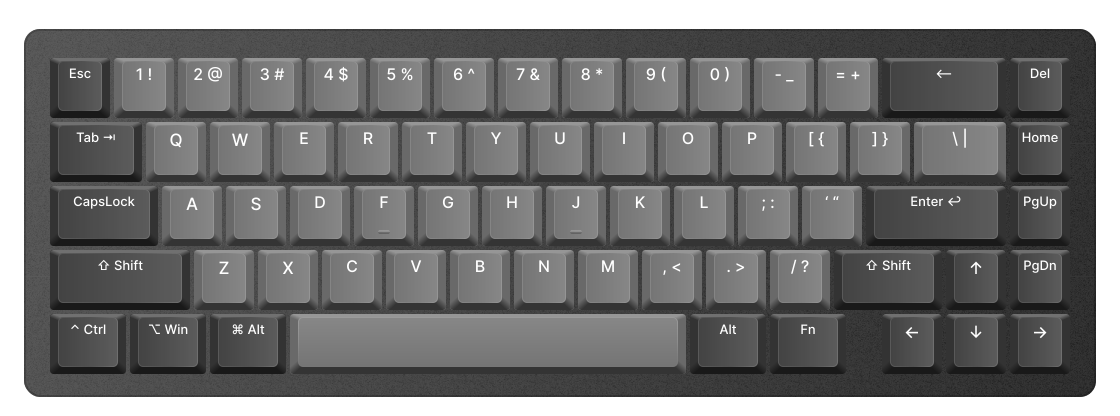
Same tool keys, same reveal keys, same F9. Pick a shortcut below the keyboard and watch the key light up where your hands expect it.
Premation uses After Effects keyboard shortcuts: V for Selection; W for Rotation; Y for Pan behind; G for Pen; Q for Rectangle; Cmd plus T for Text; F9 for Easy ease; Shift plus G for Graph editor; U for Reveal animated; Cmd plus Shift plus C for Pre-compose; Cmd plus K for Comp settings; Cmd plus Shift plus P for Command palette.
Comps and pre-comps, parenting, adjustment layers, track mattes, text animators, Classic 3D. Not lookalikes — the same concepts, under the same names.
V, W, Y, G, Q for the tools. U reveals what is animated, P/S/R/T/A open the transform rows, F9 eases. Every key is rebindable if yours differ.
No rotoscoping, and 183 effects against 400-plus once third parties are counted. If your work needs those, After Effects is the right answer and we will not pretend otherwise.
Two walkthroughs that go end to end, naming the actual panels and buttons rather than describing them in general. No prior motion-graphics experience assumed.
The editor is AGPL-3.0 and runs offline with no account. You pay only if you want projects synced and rendered on our hardware.
The whole editor on your own machine, under the AGPL.
DownloadThe assistant and the plugin platform are part of the hosted builds and are absent here — the local edition has no backend, no registry and no revocation list. Everything else runs anywhere the app does.
Everything in self-hosted, plus the cloud. Free while we're in beta.
Get the appFree and open to everyone during the beta. Paid plans are coming soon at $12/month; your projects will always export back to the free build.
Premation is a free, open-source motion editor for macOS and Windows: a desktop motion design studio for keyframe animation, motion graphics, kinetic typography, character rigging and video compositing. It is built as an After Effects alternative — the same composition, layer, keyframe and graph-editor model, the same tool keys and reveal keys — so an After Effects user is productive on day one, and someone new learns one set of concepts that transfer.
It runs on your GPU, saves to your disk and needs no account. Compositions render through WebGPU, with WebGL2 as the fallback, and the same render graph that draws the preview writes the export, so what you scrub is what you ship. Exports cover MP4, WebM with alpha, ProRes 4444, HDR10 and HLG, PNG and EXR sequences, GIF, Lottie JSON, SVG and editorial hand-offs.
The editor is licensed under the GNU AGPL v3.0. The optional cloud — synced projects and hosted renders — is the only paid part, and the desktop app never depends on it. It is in public beta at version 0.7.0, shipping weekly; the changelog and the known-gaps page say exactly what is there and what is not.
Yes. Premation is 100% free and open-source under the GNU AGPL v3.0. The desktop motion graphics editor runs completely offline on your local machine with no mandatory accounts, no cloud dependencies, and no paywalls for core editing features. Projects are stored as open .motion files on your disk.

No account needed. Projects are .motion files on your disk.
Every build is published on GitHub Releases, alongside the source it was built from.
macOS blocks apps from unidentified developers, so the first open needs the right-click menu. Once, per copy of the app.
Open the .dmg and drag it across. Take Premation-macOS-arm64.dmg on Apple silicon and Premation-macOS-x64.dmg on Intel. The arm64 build will not run on an Intel Mac at all.
Not a double-click. Control-click or right-click the app in Applications. The right-click route adds an Open button that a double-click does not offer.
That is the whole workaround. macOS remembers the decision for that copy, so normal double-clicking works from then on.
Both platforms only ask because the beta builds are unsigned. Signing removes the step on each, and no reinstall is needed when it lands. Setup and updates guide
Premation renders every frame on the GPU via WebGPU or WebGL2 fallback. A hardware graphics processor is required.